Python · Graph API · Windows / Linux
FBManager
A Python CLI for Facebook Pages I’m authorized to manage. It brings publishing, Page authorization, and local action history into one terminal workflow, with an interactive menu or individual commands.
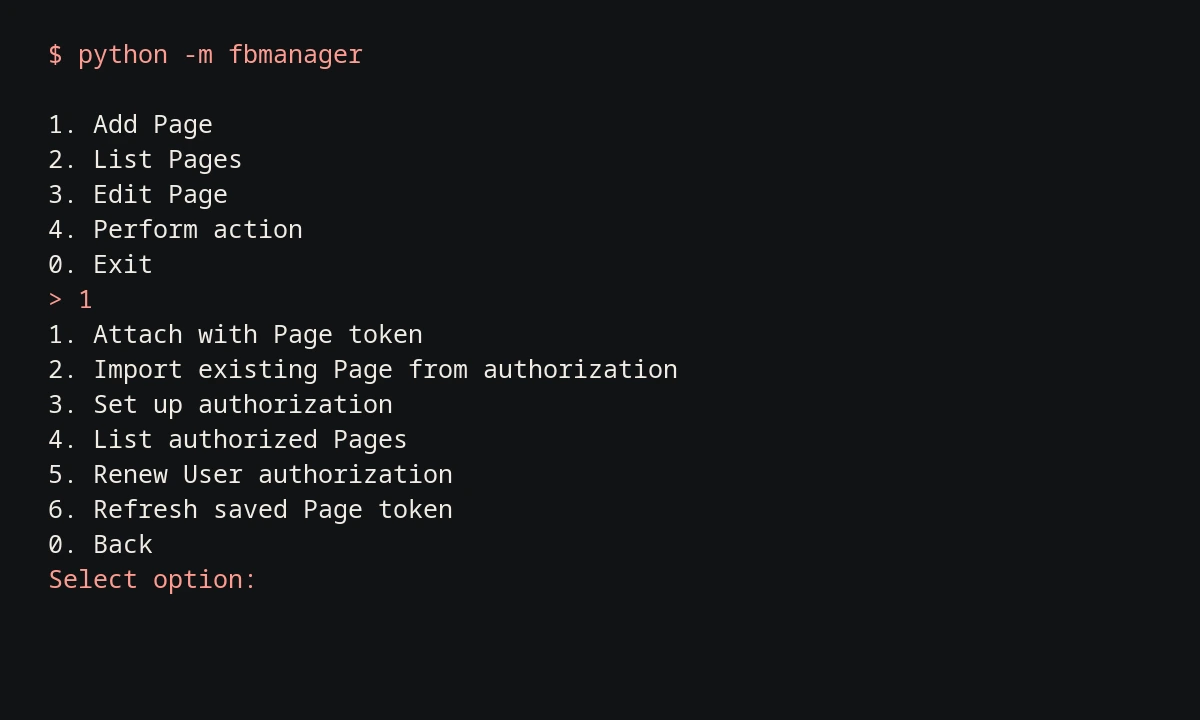
Page management, one prompt at a time.
Read the captured session ↗The capture shows the actual main menu and Page setup options from a local run. Choose a saved Page, prepare a post, or check its history without leaving the terminal.
This session was recorded offline with an empty database. Publishing requires a Meta app and Page permissions; live publishing was not tested for this showcase.
- Connect the Pages you manage.
Import authorized Pages or attach a Page token, then save each Page under a local nickname. Renew authorization and refresh tokens from the CLI.
- Publish text, images, or links.
Post text, a single image, or a link preview; comment and like as a saved Page. The menu previews actions before confirmation. Direct commands submit immediately.
- Keep track of what happened.
SQLite stores the local action history. JSON output makes Page lists and command results usable in scripts.
Read-only command examples
$ python -m fbmanager --help
$ python -m fbmanager accounts list
$ python -m fbmanager --json accounts list
$ python -m fbmanager history --limit 10
Credentials and uncertain requests.
Credentials are encrypted with Fernet using a key derived from a vault passphrase with scrypt. Page metadata and action history remain unencrypted in the local database.
If a write request loses its response, the action may already have succeeded. FBManager records an unknown status instead of automatically retrying, so I can check the result before sending it again.